№ 54 - Infinex Extension, Monad, and more.
Dec 4, 2025
Infinex Extension
You can now use your Infinex account with onchain apps like any other wallet. Download the extension from the Chrome Web Store for your browser to get started.
With the extension installed, connecting to onchain apps feels familiar. Simply choose Infinex from the list of available wallets and use your account passkey to sign transactions.
Extension features
- Login with your account passkey (no seed phrases or passwords)
- Connect to onchain apps on all supported networks
- See and use all of your imported wallets and assets
- Clearly see what you're signing before you sign
- Sign transactions with your account passkey
- Swidge quickly without leaving the extension
- Pay for networks costs from your integrated gas account
- See your whole portfolio at a glance
- Filter by wallet, asset, network, and more
- Look up tokens, prices, and charts
- View your onchain activity
- Manage app connections
- Quickly switch between Infinex accounts
- Optional app allowlist for additional protection
Getting started with the Infinex extension
- Download the extension from the Chrome Web Store (note: only install the extension from the official and verified Chrome Web Store listing).
- If you already have an Infinex account, simply login with your account passkey
- If you don’t have an Infinex account, you can create a new one or import an existing wallet to get started quickly.
Monad is live
Monad is now live on Infinex.
You can deposit, send, and swidge to and from Monad chain, buy and trade Monad tokens like MON, WETH, WBTC, CHOG, and more. Plus, you can connect to Monad apps using the new Infinex Extension.
You can also swidge into any Monad token by pasting in a contract address directly into swidge.
We've added a number of Monad apps to our Extension allowlist, including but not limited to nad.fun, Kuru, and Lumiterra, so you can explore the ecosystem and earn Monad rewards.
Gas account
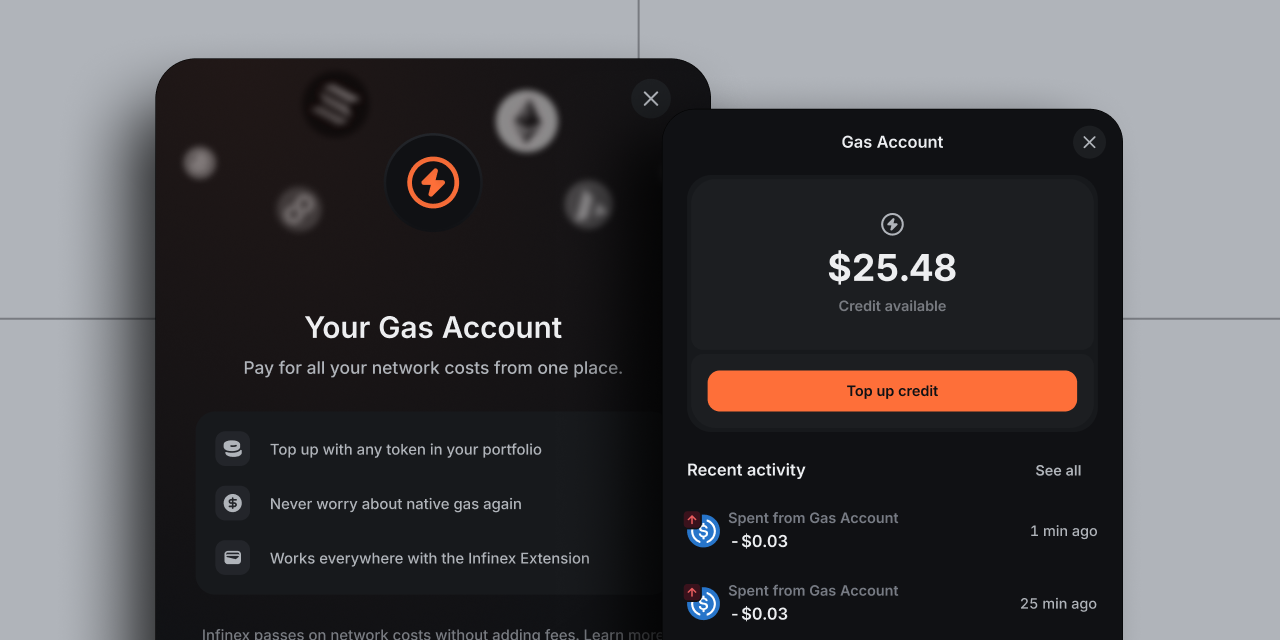
With the addition of multi-wallet support and the Infinex Extension, we're rolling out an integrated gas account for all users. The gas account serves as the one place for paying for all network costs and works in-app and in-extension, on all supported chains.
The gas account is used for network costs only, and Infinex never adds fees on top.
How to use the gas account
- top up your gas account with almost any token in your portfolio
- see the estimated network cost in real time when transacting
- draw down on your gas credit as you transact
- see a history of your network fees at a glance
You can also choose to use native gas tokens already in your wallet, if you have them.
When do you pay network costs from your gas account?
You'll only pay network costs from your gas account when you:
- Send or move assets between wallets (except sends/moves from EVM Vaults)
- Do transactions with onchain apps using the Infinex Extension
You don't pay network costs from the gas account when you:
- Swidge
- Add funds to your Infinex Perps account
- Trade on Infinex Perps
- Top up the gas account
Patrons
Patrons will continue to enjoy a largely gas-less experience inside the Infinex app. We'll continue to cover the network cost of transactions, except:
- when swidging from Ethereum Mainnet or when "priority mode" is enabled
- when send or moving assets on Solana and Ethereum Mainnet
Back to What's new